

PublicLewdness @publiclewdness@gameliberty.club
- Github
- https://github.com/Simmonz
- Open Collective
- https://opencollective.com/matthew-boyd1
I have been gaming since 1992 and building PCs since 2003. I enjoy Linux, supporting FOSS projects and am a tinfoil hat connoisseur.
Many FOSS projects rely on donations. If you have money to spare but don't know which to donate to take a look at the above links on Ko-fi, Github, and Open Collective. Anything on there that I have sponsered or contributed to is something I have found to be worthy.
Joined Feb 2022
PublicLewdness
boosted

I installed void linux on a ThinkPad T420 laptop today using this guide by "Jake@Linux":
https://jpedmedia.com/tutorials/installations/void_install/index.html
Had to go through it twice, due to my ThinkPad BIOS being set to boot to "legacy first" instead of "UEFI only", so the first time I booted the Void USB it booted in Legacy mode and I was not aware of it.
Learned quite a bit and was successful in the end.
Super minimal. I did install the cwm Window Manager and created the .Xauthority and .xinitrc files with enough to get x11 to start with startx and get into the graphical environment.
I haven't imported my cwm config or other files yet. Another day.
#voidlinux #linux #thinkpad
https://jpedmedia.com/tutorials/installations/void_install/index.html
Had to go through it twice, due to my ThinkPad BIOS being set to boot to "legacy first" instead of "UEFI only", so the first time I booted the Void USB it booted in Legacy mode and I was not aware of it.
Learned quite a bit and was successful in the end.
Super minimal. I did install the cwm Window Manager and created the .Xauthority and .xinitrc files with enough to get x11 to start with startx and get into the graphical environment.
I haven't imported my cwm config or other files yet. Another day.
#voidlinux #linux #thinkpad
PublicLewdness
boosted

New Steam Games with Native Linux Clients - 2025-01-01 Edition: https://boilingsteam.com/new-steam-games-with-native-linux-clients-2025-01-01-edition/
#linux #linuxgaming #update #gaming #steam #native #newgames
PublicLewdness
boosted
MitmProxy2Swagger: Automagically reverse-engineer REST APIs: https://github.com/alufers/mitmproxy2swagger #foss #rest #api #reverseengineer
PublicLewdness
boosted
X.org Server Development Hit a Decade High for the Number of Commits in 2024: https://www.phoronix.com/news/X.Org-Server-2024-GitStats #linux #linuxgaming #update #foss #xorg #dev
PublicLewdness
boosted

PublicLewdness
boosted

Top 5 Guns Of 2024 🇺🇸🔥
https://rumble.com/v64nma1-top-5-guns-of-2024-.html
https://rumble.com/v64nma1-top-5-guns-of-2024-.html
PublicLewdness
boosted
PublicLewdness
boosted

"Death toll up to 15, two confirmed bombs found in New Orleans attack, source says"
https://www.nola.com/news/crime_police/new-orleans-homemade-bombs/article_56eb5a08-c88d-11ef-9f31-dbdc85b46602.html#tncms-source=featured-top
PublicLewdness
boosted
PublicLewdness
boosted

PublicLewdness
boosted
PublicLewdness
boosted
Now that's a good boy.
PublicLewdness
boosted
PublicLewdness
boosted

I try to donate to various FOSS projects and developers each week when I get paid for the last few years. I spent a little time going over things and I am quite happy with how 2024 went for that. I managed to donate a total of $1705.16 CAD that went to a total of 86 projects and/or developers. That was a huge jump up from 2023's total of $899.97 CAD. That may seem like a lot but boiled down my 2024 total is $4.67 CAD a day. I spend more on coffee than that. I spend more on snacks when on break at work than that some days. I share this just because if you use FOSS projects and you want them to continue to thrive and improve try to see what little bits you can give to the people and groups that make it happen because little bits add up over the course of the year. One thing I am going to try to do is have a little more focus for 2025 and try to make sure more of the money goes to projects that I use daily rather than ones that are more of a passing interest.
The top ten Projects/Developers I donated to in 2024 were:
Purism
https://puri.sm/
Trisquel
https://trisquel.info/
OpenHV
https://www.openhv.net/
Open Collective
https://opencollective.com/
Nitrux
https://nxos.org/
Mate
https://mate-desktop.org/
Red Eclipse
https://www.redeclipse.net/
Droidian
https://droidian.org/
3mdeb
https://3mdeb.com/
Castle Game Engine
https://castle-engine.io/
The top ten Projects/Developers I donated to in 2024 were:
Purism
https://puri.sm/
Trisquel
https://trisquel.info/
OpenHV
https://www.openhv.net/
Open Collective
https://opencollective.com/
Nitrux
https://nxos.org/
Mate
https://mate-desktop.org/
Red Eclipse
https://www.redeclipse.net/
Droidian
https://droidian.org/
3mdeb
https://3mdeb.com/
Castle Game Engine
https://castle-engine.io/
PublicLewdness
boosted

Happy 2025 everyone! On this first day of the fresh new year we are happy to announce 50 Free and Open Source projects were selected to receive NGI Zero grants.
We'd like to congratulate all the teams and individuals and thank them for working on a better internet for us all.
Come over and meet the projects:
https://nlnet.nl/news/2025/20250101-announcing-grantees-June-call.html
PublicLewdness
boosted

PublicLewdness
boosted

New Orleans Terror Attack:
https://x.com/LeadingReport/status/1874519659900493897

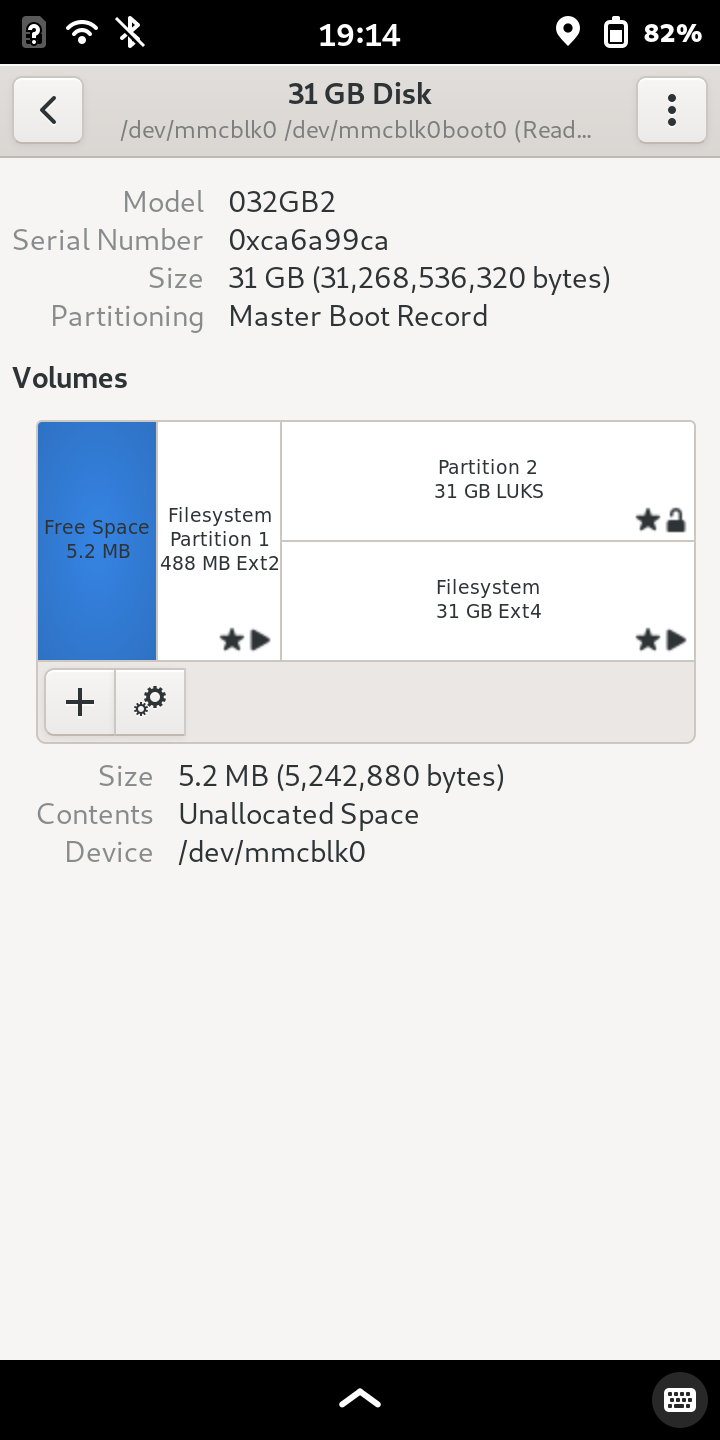
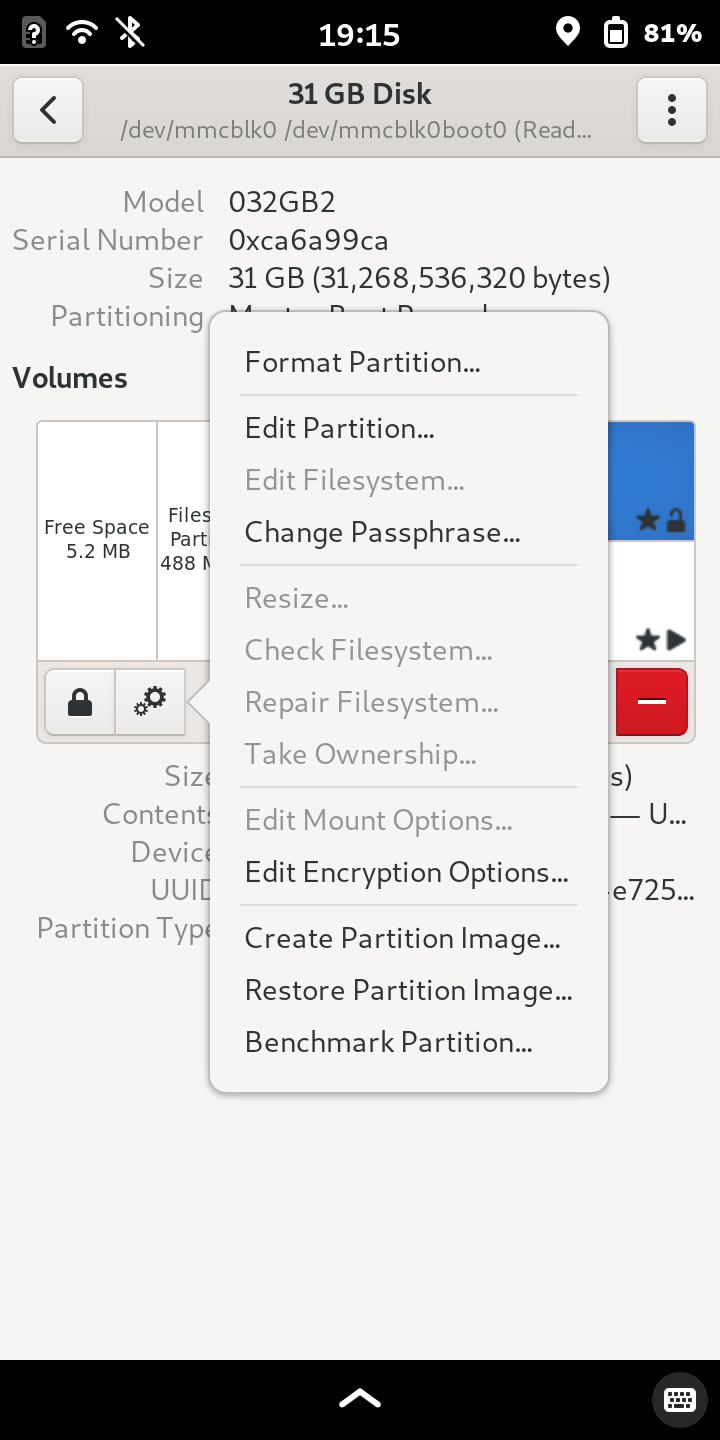
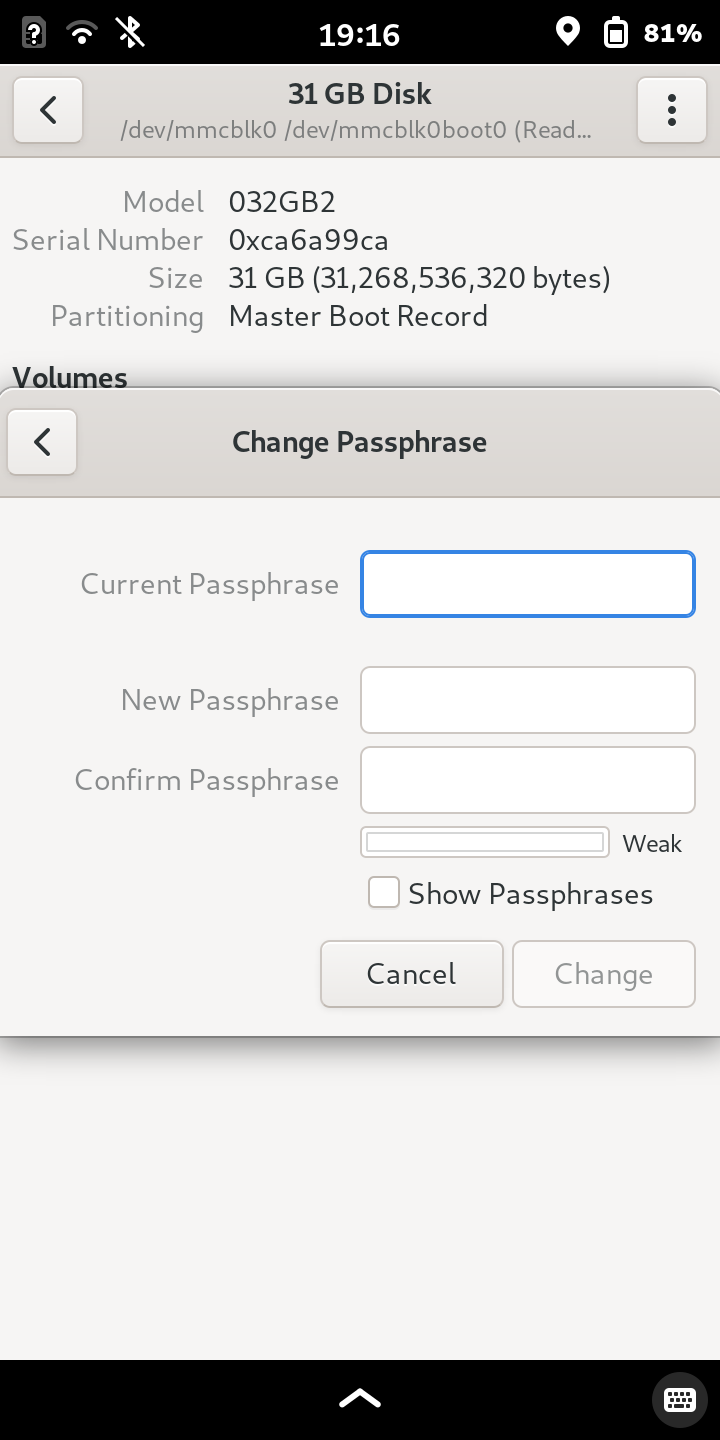
I went over how easy it was to enable Full disk encryption on the FLX1 recently, so today I'm going to go over how to change the FDE password on a Librem 5 which uses PureOS. The Librem 5 comes preinstalled with FDE, at least mine did. The default password is on the bottom right square of the quick start guide, mine was "123456". To change this you just open the Gnome Disk Utility (also known as "Disks"), Tap the 31GB Disk, tap Partition 2, tap the gear in the bottom left, tap change passphrase, enter current password, enter new password, confirm new password, tap change password, then reboot the phone. Many mobile Linux options lack FDE outright and those that have it can make it difficult to setup. PureOS on my Librem 5 not only has it but it is very easy to change which is good because keeping a known default password is a terrible idea.
So a easy quick breakdown of the steps above is:
disks>select partition>gear>change passphrase>enter current>enter new>confirm>change>reboot
- Github
- https://github.com/Simmonz
- Open Collective
- https://opencollective.com/matthew-boyd1
I have been gaming since 1992 and building PCs since 2003. I enjoy Linux, supporting FOSS projects and am a tinfoil hat connoisseur.
Many FOSS projects rely on donations. If you have money to spare but don't know which to donate to take a look at the above links on Ko-fi, Github, and Open Collective. Anything on there that I have sponsered or contributed to is something I have found to be worthy.
Joined Feb 2022
