
@hideki How do I move to an object in blender? Like say I got a cube that's super far away, is there a shortcut to jump to it? I did it accidentally with the camera but I can't find shit on doing it intentionally

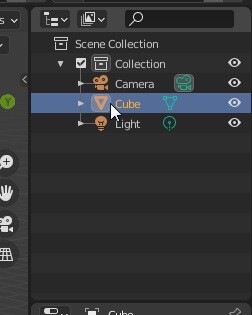
Click on the cube on the scene outliner (this tree list of the objects on the scene), then while having the mouse cursor in the 3D viewport, press the dot in the numeric keyboard, and you will jump right to the cube
Follow
No problem
i say click on the outliner first because i assume the cube may be out of view, but it works also with selecting the objects from the 3D viewport too
